To help ensure your prices are as accurate as possible you can set up supplementary pricing for your road transportation services.
Supplementary prices can be set against 3 criteria:
Weight of the items
Volume of the items
Total number of items
Supplementary prices have the following components which can be seen in the example below:
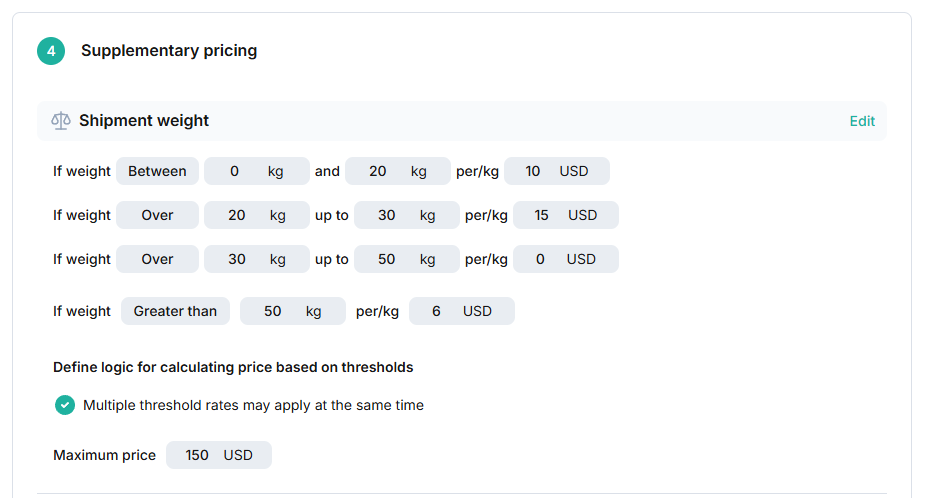
1 - Between rules
These parameters allow you to set incremental prices line by line. Your first line must always start at 0. Your second rule will always start where the last rule finished.
2 - A greater than rule
This will tell the system what price to apply on anything over the final amount of your between rules.
3 - Pricing logic
You must select from one of two options for the pricing logic. You can either select to apply multiple thresholds at the same time or only to apply the matched threshold.
Example:
In the image above we can see that if the shipment weight is between 0 → 20 then we should charge 10 USD per Kg and if the shipment weight is between 20kg - 30kg then we should charge 15 USD per Kg. If the shipment weight was 25kg:
If the “Multiple threshold rates” option is selected then the system will apply the 10 USD rate to the first 20 kg of the shipment and the 15 USD rate to the final 5kg.
If the “Matched threshold rate only” option is selected then the system will apply the 15 USD rate to the entire 25kg shipment and ignore the 10 USD rate.
4 - Maximum price
It is also possible to add a maximum price for the supplementary conditions. The system will only apply pricing up to this ceiling price and then stop.
